
Git Worktrees
Lerd treats every git worktree as a first-class scope: each branch checkout gets its own subdomain, its own optional database, its own PHP and Node versions, and its own slot in the dashboard. Branch names are sanitised to be subdomain-safe, /, _, and . are replaced with -, and non-alphanumeric characters are stripped.
cd ~/Lerd/myapp                                    # parent site, branch: main
git worktree add ../myapp-feature feature/auth     # creates the worktree
# Lerd writes the vhost feature-auth.myapp.test → ~/Lerd/myapp-feature/public
Plain git worktree add from any tool (CLI, IDE, GitLens) is enough to get a usable URL. For the full opinionated flow with prompts for DB isolation and a frontend build, use the lerd worktree add wrapper described below.
lerd worktree add and lerd worktree remove
The wrapper commands mirror git worktree's subcommand layout, every flag passes straight through to git, and add an interactive setup pipeline on top. lerd worktree wait is the non-interactive companion for scripts and tools that use plain git, see waiting for the pipeline.
lerd worktree add <git args>
cd ~/Lerd/myapp
lerd worktree add feature/auth                     # check out an existing branch
lerd worktree add -b feat-x                        # create a new branch named feat-x
lerd worktree add --detach feat-x abc1234          # detached checkout at a commit
lerd worktree add --track -b feat-x origin/feat    # tracking branch
After git completes, the wrapper:
- Polls until the watcher has installed dependencies (
composer install+npm ci) and synced the worktree's env file. Which file that is comes from the framework definition'senv.file, so it follows the framework rather than assuming.env: Symfony settles on.env.localand Magento onapp/etc/env.php, while Laravel and CodeIgniter use.env. The env file is set up before installs sonpmbuild steps that readVITE_*env vars compile against the right values. - Prompts what should serve the worktree's frontend assets. The select lists every framework worker eligible to replace the build (asset workers with
replaces_build: trueand a passingcheck, e.g.vite), every production-build script declared inpackage.json(build,prod,build:prod,build-prod,production), and a Skip option. The default is the first asset worker that's already opted into the parent's.lerd.yaml workers:, then the first npm script, then skip. Picking an asset worker starts it as a per-worktree unit (withpersist=false, so it doesn't get added toworkers:); picking an npm script runs it once. - Prompts how to set up the worktree's database, see Per-worktree database below.
- If you pick "isolated empty", asks whether to run
php artisan migrate --forceagainst the new schema right away.
The asset-worker option appears even when the worker isn't in the parent's workers: list, as long as the framework declares it and its check passes (e.g. node_modules/vite exists). That lets you opt into vite for a single worktree without editing the parent yaml. The choice is per-session: on a daemon restart only opted-in workers get auto-started by scanWorktrees, so an ad-hoc pick won't survive a lerd stop && lerd start. If you want it permanent, run lerd setup to add it to workers:.
When an asset worker is opted-in on the parent, the watcher also auto-starts it as a per-worktree unit independently of the prompt, a systemd .service on Linux, a launchd plist on macOS. Multiple worktrees can run Vite simultaneously, each gets its own unit (lerd-vite-<site>-<branch>) and Vite auto-increments ports. The same auto-start runs at daemon boot too, so per-worktree units recover after a host reboot or lerd stop && lerd start even when fsnotify hasn't fired. On lerd worktree remove, the matching units are stopped and their unit files removed before git tears the worktree down, without that step, the supervisor would restart-loop the unit against the deleted WorkingDirectory.
Skipping both the asset worker and the npm script leaves the worktree without a Vite manifest, which means the first request will throw ViteManifestNotFoundException until you run npm run dev or npm run build yourself. That's intentional, the alternative is silently rendering main's compiled UI on the worktree, which is worse.
lerd worktree remove <git args>
lerd worktree remove main
lerd worktree remove --force main          # discards local modifications
The wrapper runs git worktree remove and, when needed, falls back interactively. If git refuses with the use --force hint (modified or untracked files in the worktree) the wrapper offers a select prompt to retry with --force instead of forcing the user to rerun the command.
After git succeeds the wrapper asks whether to delete the worktree's isolated database. The default is Keep the database: if you re-create the worktree on the same branch later, the dashboard prompt will offer to reuse the preserved data without rebuilding it. Picking Drop drops the database and removes its registry entry.
Auto-setup pipeline (any git worktree add)
Whether you use lerd worktree add or the bare git command, the daemon's watcher (lerd-watcher) sees the new entry under .git/worktrees/ and runs the same setup steps in this order:
- Wait for
HEADto be a final ref or SHA, git writesgitdir/HEADover multiple steps and the watcher must avoid acting on a half-written detached state. - Seed
vendor/andnode_modules/from the main repo when the worktree'scomposer.lock/ JS lockfile matches main's, using reflinks where the filesystem supports them (btrfs, xfs-reflink, APFS) and a plain copy elsewhere. - Copy any path the main repo's
.lerd.yamllists inworktree_include, for gitignored files the app needs that git doesn't check out (see extra files below). - Sync the framework's env file from main with its base-URL key rewritten to the worktree's vhost domain. The file, its format and the key all come from the framework definition, so Laravel gets
.env/APP_URL, Symfony.env.local/DEFAULT_URI, CodeIgniterconfig/.env/app.baseURL, and the PHP-config frameworks are seeded through their own writers: WordPress'swp-config.php(rewritingWP_HOME) and Magento'sapp/etc/env.php(carried across for its database credentials). Magento keeps its base URL in the database rather than in a single env key, so it declaresworktree_url_keysinstead, and the seededenv.phpoverrides the database with the worktree's own domain. Writing that base URL changes the config hash Magento keeps in the database, so its definition also declares aworktreeblock: the worktree gets its own database cloned from main, andapp:config:importruns against it once the file and the database are both in place. When.lerd.yamldefinesenv_overrides, those dotenv templates are resolved on top (see env overrides below). - Run
composer install(skipped when the marker is at-or-newer thancomposer.lock) andnpm ci/pnpm install --frozen-lockfile/yarn install --immutable/bun install --frozen-lockfile(skipped under the same marker rule). - Generate the worktree's nginx vhost. It inherits the parent site's framework, so the document root follows the framework's
public_dir(pubfor Magento,webfor Drupal,webrootfor CakePHP) rather than assumingpublic, and any nginx snippet the framework declares is spliced in, expanded against the worktree's own checkout.
Frontend build (npm run build) is not part of the watcher pipeline, it's heavy, project-specific, and can fail silently. lerd worktree add runs it interactively after asking; using bare git worktree add you run it yourself.
public/build/ is also intentionally not seeded from main: it's a build artefact of the source tree, and copying it would render main's compiled UI on the worktree until the user noticed.
| Resource | Behaviour |
|---|---|
vendor/ | Reflink/copy from main when composer.lock matches; otherwise skip and let composer install build from scratch (no stale autoload entries). |
node_modules/ | Same lockfile-match guard against pnpm-lock.yaml / yarn.lock / bun.lock* / package-lock.json / npm-shrinkwrap.json (whichever exists). |
public/build/ | Not seeded. Run npm run dev (Vite dev server, hot reload) or npm run build (static manifest) inside the worktree. |
worktree_include paths | Copied from main when the worktree doesn't already have them; see extra files in a worktree. |
| env file | The framework's env file (Laravel .env, Symfony .env.local, CakePHP config/.env) copied from main; the framework's base-URL key (APP_URL, DEFAULT_URI, app.baseURL) rewritten to http(s)://<branch>.<site>.test (or resolved via env_overrides when defined). Realigned on every subsequent watcher pass so a branch rename keeps the value current. |
Why not symlink?
Earlier lerd versions symlinked vendor/ to save disk. PHP resolves __DIR__ through symlinks to the real path, so Composer's ClassLoader would initialise against the main repo and silently load stale classes. Real copies (or reflinks) avoid the problem at no meaningful disk cost on modern filesystems.
Waiting for the pipeline
A tool that creates a worktree and then wants to act on it, run tests, run a composer script, seed config, has to let the pipeline finish first, or the two write the same tree at once. lerd worktree wait blocks until it settles:
git worktree add ../myapp-feature feature/auth
lerd worktree wait ../myapp-feature --timeout 10m
Without a path it waits on the current directory. Nothing is printed on success, the exit status is the contract:
| Status | Meaning |
|---|---|
0 | Provisioned, and no install is running. |
1 | The timeout elapsed first. |
3 | This path is not a worktree lerd manages, so nothing will ever provision it. |
Do not try to infer this from the tree's contents. Composer's extraction phase fills existing vendor/<org>/ directories, so neither an entry count nor a shallow mtime moves during the longest part of an install, and node_modules/ exists from the first extracted package. The command watches the pipeline's outputs and its install lock together, which is why it can tell a finished install from one still running. lerd worktree add uses the same wait internally.
HTTPS
If the parent site is secured with lerd secure, worktree subdomains inherit HTTPS automatically. When a worktree is created on a secured site, lerd reissues the parent's mkcert certificate to include *.branch.myapp.test SANs, so deep subdomains (e.g. app.feature-auth.myapp.test for multi-tenant apps) are also covered. The worktree's nginx vhost includes *.branch.myapp.test in its server_name directive.
lerd secure myapp
# myapp.test                          → https
# feature-auth.myapp.test             → https  (automatic)
# app.feature-auth.myapp.test         → https  (wildcard SAN)
The framework's base-URL key in each worktree's env file (APP_URL for Laravel, DEFAULT_URI for Symfony) is rewritten to https:// when you secure the parent (and back to http:// on lerd unsecure).
Env overrides
By default lerd only rewrites the framework's base-URL key in worktree env files. Multi-tenant apps and other projects that derive multiple env variables from the site domain can define env_overrides in .lerd.yaml:
env_overrides:
    APP_URL: "{{scheme}}://app.{{domain}}"
    CENTRAL_DOMAIN: "{{domain}}"
    DB_DATABASE: "{{parent}}_{{branch}}"
    CACHE_DRIVER: redis
Values can use template placeholders or be plain static strings. When a worktree is created (or the watcher re-syncs), each value is resolved and written into the worktree's .env. Newlines or \r characters in a value are rejected so a malformed override can't inject a second key into .env; the same check rejects = or newline characters in keys.
| Placeholder | Resolves to | Example |
|---|---|---|
{{domain}} | Worktree domain | feature-branch.myapp.test |
{{scheme}} | http or https | https |
{{branch}} | Worktree branch slug (no parent) | feature-branch |
{{parent}} | Parent site name, slugified | myapp |
{{site}} | Database-safe slug of the full worktree domain. Prefer {{branch}} / {{parent}} for clarity | feature_branch_myapp_test |
When APP_URL is present in env_overrides it takes precedence over the default scheme://domain rewrite. Without env_overrides, behaviour is unchanged.
DB_DATABASE is the one templated key the worktree-DB isolation flow owns: when the worktree is marked db_isolated: true in its own .lerd.yaml (set by lerd db:isolate or the dashboard's Isolated DB toggle), the watcher leaves the DB_DATABASE value alone on subsequent ticks instead of re-rendering it from the parent's env_overrides template. Switching isolation back off restores the parent's value and the template applies again on the next pass.
Extra files in a worktree
git worktree add only checks out tracked files, so anything gitignored that the app needs to boot stays behind in the main checkout. Beyond the framework's env file (which lerd already carries across), list those paths in the main repo's .lerd.yaml:
worktree_include:
    - auth.json
    - storage/oauth-private.key
    - .config/local/
Paths are relative to the project root and can be files or directories. Each one is copied from the main repo into the worktree when the worktree does not already have it, so a file you edit inside a worktree is never overwritten by a later watcher pass, and a path the main repo doesn't have is simply skipped. Missing parent directories are created.
Paths that resolve outside the project root (../secrets, or an absolute path) are ignored. .lerd.yaml is committed and travels with the repository, so cloning a project must never be able to pull files from elsewhere on the machine into a checkout.
Web UI
In the Sites tab, a git-backed site carries a tab strip above its address bar: the main checkout first, then one tab per worktree, each wearing a git-branch icon. Selecting a tab switches the whole detail view to that checkout, and the path on the tab row follows it.
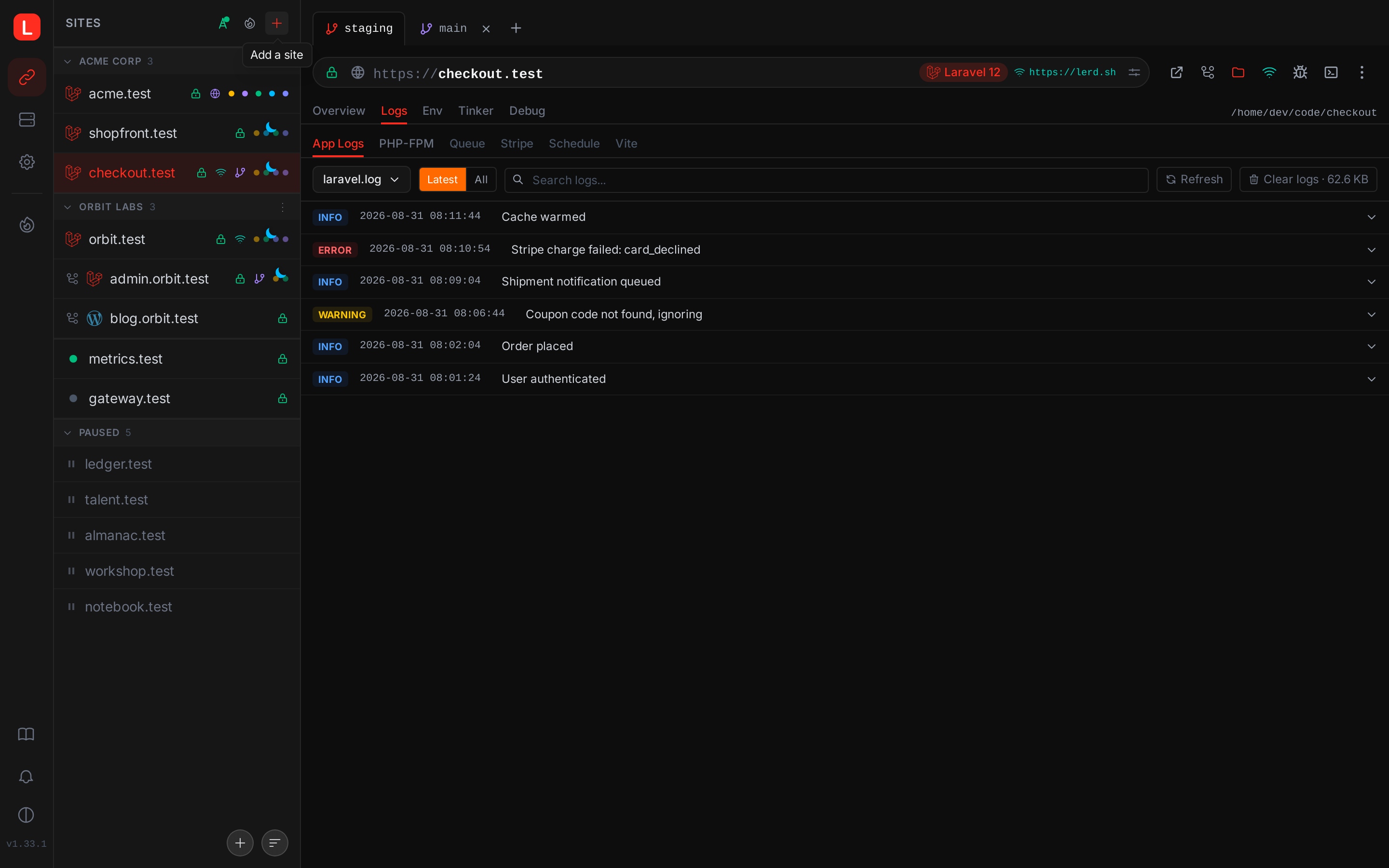
Picking a tab re-scopes the rest of the detail view to that worktree:
- The site title and the Open / Terminal buttons target the worktree's domain and checkout path.
- The App logs tab tails
storage/logsfrom the worktree's directory rather than main's. - The Tinker tab REPL runs inside the worktree's PHP context (its own
.env, its own vendor). - The Request timing panel shows the branch's own traffic: requests to the worktree's subdomain are recorded against it, and its slow routes open and profile on that subdomain. The parent's timing stays separate, though a worktree's requests still count toward the site when the sites list is ordered by traffic. See Request timing.
- The PHP and Node version selectors show the worktree's effective version. A dashed violet border indicates "Inherits from main"; changing the value persists a worktree-only override.
- Worker toggles (queue, schedule, Horizon, Reverb, custom workers) collapse into a "Workers run from main" pill, those run against main's checkout regardless of which worktree is active. Switch to main to start or stop them.
- The domain-edit pencil disappears (worktree domains are derived from the parent's primary).
Adding and removing worktrees
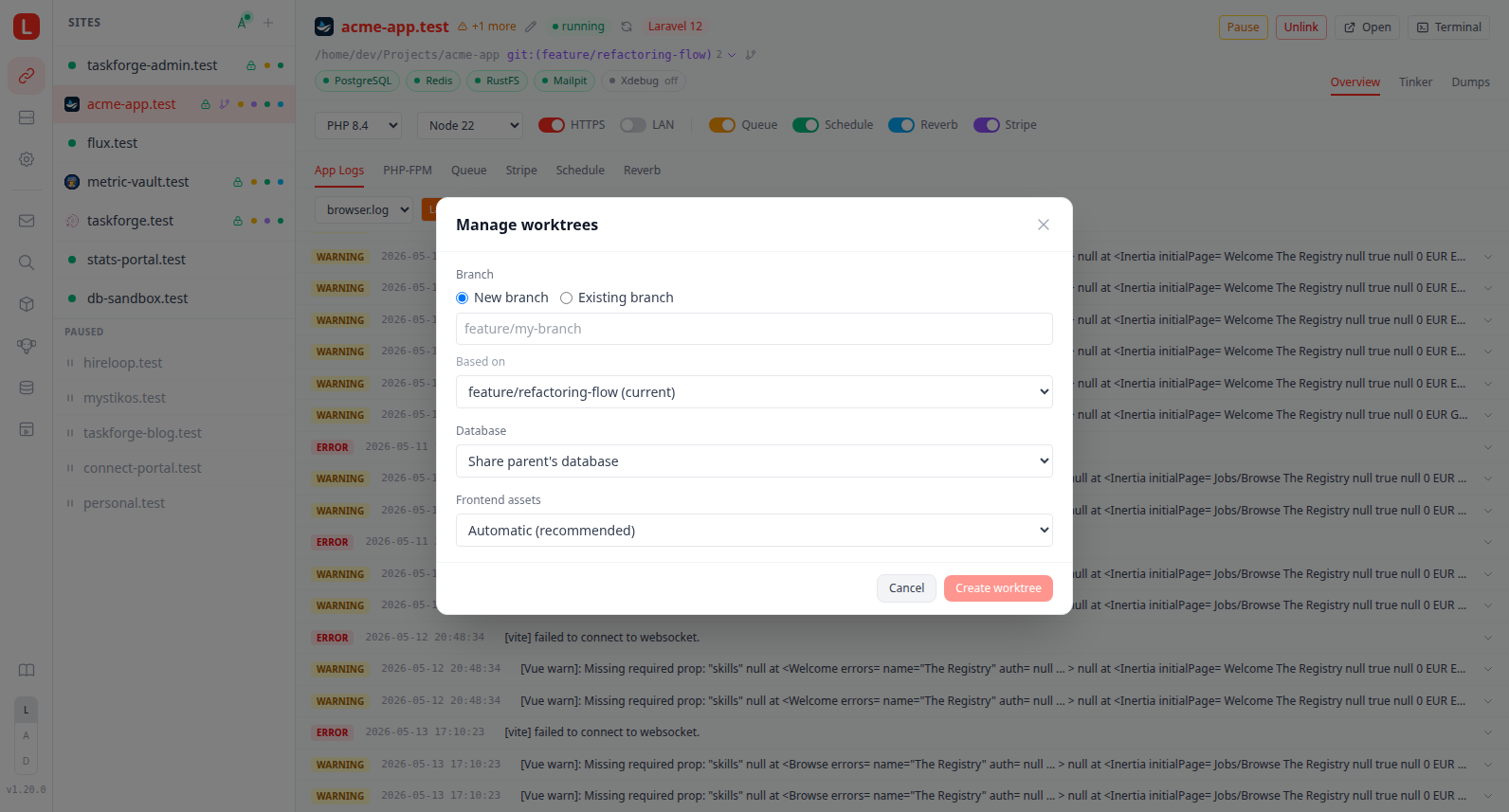
Both live on the tab strip, so neither needs a terminal. A worktree tab carries an inline ×, and the trailing + opens the add form.
- Remove (the × on a worktree's tab) expands an inline confirm with a Discard uncommitted changes checkbox (passes
--forcetogit worktree remove) and, when the worktree has an isolated database, an Also drop database checkbox (off by default, matchinglerd worktree remove, so the data survives a re-add). After git tears the worktree down, the per-worktree worker units are stopped and, if requested, the isolated DB is dropped; the watcher cleans up the vhost and LAN-share port asynchronously. - Add worktree (the trailing + tab) opens a form with the same choices
lerd worktree addasks for: a new branch (the Based on picker starts on the main checkout's current branch, which is why that branch has no separate entry in the list, and offers every other local and remote-tracking branch as a start point) or an existing branch (the dropdown lists local branches not already checked out plus remote-tracking branches, which git dwims into a fresh local branch); the database (share the parent's, isolated empty schema, isolated cloned from main, isolated cloned from another worktree, or, when a preserved isolated DB exists for that branch, reuse/reset it); a Run migrations checkbox shown when the database starts empty and the project is Laravel; and the frontend-asset choice (Automatic, an eligible asset worker, annpm runbuild script, or skip). The checkout directory is chosen automatically as a sibling of the project,<project-path>-<sanitized-branch>. Submitting streams thegit worktree add+ dependency-install + build + DB-setup progress live in the modal. When the frontend-asset choice is Automatic, the modal log emits anAutomatic: ...line explaining which branch the resolver took (asset worker started, npm script run, or nothing-to-do), so the picked path is never silent. Skip picks also log a one-liner so the modal never goes quiet after the dependency-install phase.
Per-worktree PHP and Node versions
Each worktree can pin its own PHP or Node version without affecting the parent site, the natural way to test a runtime upgrade on a feature branch.
When you pick a non-default value from the version selector while a worktree is active, lerd writes the override to .lerd.yaml inside that worktree's checkout. The file lives in the working tree, so the choice travels with the branch in git.
# .lerd.yaml inside the feat-php84 worktree only
php_version: "8.4"
node_version: "24"
The override is honoured wherever lerd materialises worktree state on disk: vhost generation on add, rename, pause/unpause, the watcher's startup sweep, and lerd secure/lerd unsecure. The commands that run PHP in a container follow it too, so lerd php and lerd composer from inside the checkout use the worktree's version rather than the parent's, whether the worktree sits beside the project or inside it. Switching a worktree's version writes the target version's FPM quadlet the same way a site switch does, so the vhost it generates always has a container behind it. Worktrees with no override inherit the parent's pinned version (not the highest-installed satisfier of composer.json/package.json constraints, that detection only kicks in for unregistered directories).
Site-level resources stay shared and cannot be overridden per worktree: domain (derived from the parent), TLS certificate (parent's wildcard cert), LAN share port (worktree-scoped LAN share is a separate toggle), workers, and any custom container settings.
On a site running its own per-site image (runtime: fpm-custom or a port-bearing container: site), a worktree is served from that image rather than the shared per-version container, and lerd php and lerd composer inside the checkout exec into it too. Whatever the Containerfile adds is therefore present on the branch exactly as it is on the parent, wherever the checkout lives.
Per-worktree database
By default every worktree shares the parent site's database. The dashboard's Isolated DB toggle and the lerd worktree add prompt opt the worktree into its own schema, named <parent_db>_<sanitized_branch> in the same service the parent uses (mysql, mariadb, or postgres). The worktree's env file is rewritten so its database-name key points at the new schema, and db_isolated: true is persisted to the worktree's .lerd.yaml so the choice travels with the branch. The env file, its format and the host/name keys are resolved from the framework definition, so Laravel's DB_DATABASE in .env and Magento's db.connection.default.dbname in app/etc/env.php are rewritten the same way.
Because that flag lands in a tracked file, a worktree that should not carry it into the branch can set db_isolated: true in an untracked .lerd.local.yaml instead, alongside anything else that belongs to this checkout and not to the repository. See Local overrides.
When isolation is enabled lerd asks where the new schema should start from:
| Source | What happens |
|---|---|
| Empty | New schema with no tables. The wrapper then offers to run php artisan migrate --force against it. |
| Clone from main | mysqldump --single-transaction (or pg_dump) of the parent's DB piped into the new schema, entirely inside the service container. |
| Clone from another isolated worktree | Same dump/restore pipeline, source is an existing isolated worktree's DB. Useful when staging migrations on top of an already-migrated branch. |
The isolated database survives lerd worktree remove by default, the wrapper asks at the end whether to drop it, and Keep the database is the default. Re-adding the same branch via lerd worktree add later detects the preserved entry and offers two extra options at the top of the DB-isolation prompt:
- Reuse preserved isolated DB: reconnects the worktree to the same data with no schema changes.
- Reset preserved DB to a fresh empty schema: drops the existing DB, recreates it empty, then offers to run migrations.
The same toggle is available on the dashboard for already-active worktrees: flipping Isolated DB off opens a confirmation modal naming the database that is about to go, and on confirm it drops the database and restores the parent's database-name value in the worktree's env file. The toggle only appears when the parent uses a lerd-managed mysql/mariadb/postgres service. Sqlite is naturally file-based and isolated per checkout, no opt-in needed.
Per-worktree LAN share
LAN share has a separate toggle that's worktree-aware: when a worktree is active in the dashboard, the toggle controls a proxy bound to a per-worktree port (next free >= 9100 across all sites and worktrees). The proxy targets the worktree's vhost domain so devices on your network reach the worktree's URL directly, no DNS setup on the client. Removing the worktree releases the port via the watcher's cleanup pass; the dashboard QR-code popover honours ?branch= so the QR encodes the worktree's URL. Running lerd lan:share from inside the checkout does the same thing from the CLI.
Per-worktree public tunnel
Public tunnels are worktree-scoped too. lerd share run from inside a checkout tunnels <branch>.<site>.test, and the dashboard's share menu acts on whichever branch tab is active. A worktree's tunnel is a process of its own: it can run alongside the parent site's, each with its own public URL, and stopping one does not touch the other. Under --domain, the Cloudflare named tunnel is keyed to the branch as well, so routing a hostname to a worktree never takes over the one the parent site is using.
Commands that act on a directory resolve a worktree to its parent site automatically. lerd share, lerd open, lerd domain, lerd env, lerd worker, lerd runtime and the rest run from inside a checkout without linking it as a site of its own. lerd code opens the checkout you are standing in rather than the parent, since that is the copy of the files you are working on.
Cleanup ordering
When a worktree is removed (via git worktree remove directly or lerd worktree remove) the watcher tears state down in this order so that any earlier failure leaves the database intact:
- Per-worktree host-worker units (
lerd-<worker>-<site>-<branch>; systemd.serviceon Linux, launchd plist on macOS), stopped and removed so the supervisor doesn't restart-loop them against the deletedWorkingDirectory. - nginx vhost (URL stops resolving).
- LAN-share proxy + registry entry (port released).
- Isolated database, only via
lerd worktree remove's explicit prompt or the daemon'sscanWorktreesstartup sweep. Plaingit worktree removeleaves the DB and its registry entry alone, so the user can recover by re-adding the worktree without losing migrations or seed data.
The startup sweep also catches any registry entries whose worktree directory disappeared while the watcher was offline, restarting lerd-watcher reconciles state.
The sweep runs in the background, after the watcher has reported itself ready. It provisions worktrees it finds unprovisioned, which can mean a full composer install, and that has no duration worth waiting on: the watcher is up and watching from the first moment either way, so a long install shows up as a worktree that finishes setting itself up a few minutes in, not as a daemon that refuses to start. Use lerd worktree wait when you need to block until a specific worktree is actually ready.
Within the sweep, every worktree vhost is written and nginx reloaded before any dependency install starts, so a repo's subdomains all resolve within seconds of the watcher coming up rather than one at a time behind the installs ahead of them. The installs then run several worktrees at a time, since a worktree's install has nothing to do with its neighbours'. How many depends on the machine: two cores are always left for the daemons, the containers serving your other sites, and whatever you are in the middle of, and the count is capped at four beyond which the wait is the network rather than the CPU. A four-core laptop runs two installs at a time, a small VM runs one. What a subdomain serves in the meantime is a checkout whose dependencies are still landing, which is the same state the pipeline leaves it in for the first minute after git worktree add.
A lockfile the JS package manager refuses is the same lockfile in every worktree seeded from that repo, and it fails identically in each. The sweep pays that failure once per pass: after the first npm ci rejects a given lockfile, the remaining worktrees carrying it are logged as skipped instead of spending seconds each reaching the same conclusion. Fix the lockfile, or wait for the next pass, and it is tried again.
A checkout deleted without git
That ordering hangs off git's own .git/worktrees/ entry disappearing, which is what git worktree remove deletes. Deleting the checkout directory on its own leaves that entry behind, so the watcher never hears about it and the worker units keep retrying against a working directory that has gone, failing before the command runs and restarting on the supervisor's own interval indefinitely. This is no longer unusual: coding agents create and destroy their own worktrees, and they have no reason to know lerd exists.
Such a unit is reported as orphaned rather than failing, and is never offered a heal, because starting it again cannot do anything except fail in the same place. It is removed instead, on the daemon's reconciliation pass and again at startup, so an install already stuck this way recovers on its own. Nothing is preserved because there is nothing left to preserve; re-adding the worktree recreates the unit from scratch. Orphans also stay out of the failing-worker notifications, since they name a problem that resolves itself.
Deciding this needs the directory the unit is pinned to. On Linux that is the unit's own WorkingDirectory=. launchd has no equivalent to read back, so on macOS it comes from the guard script lerd writes alongside every worker plist, which is where a host-mode worker's cd and an exec-mode worker's podman exec -w already record it. The two files are written and removed together, so a unit that still exists still has one.
lerd sites output
Worktrees are shown indented under their parent site, with their own effective PHP / Node / framework version (which may differ from the parent's when an override is set in .lerd.yaml):
NAME            DOMAIN                   PHP    NODE   TLS   PATH
myapp           myapp.test               8.5    22     ✓     ~/Lerd/myapp
↳ feature-auth  feature-auth.myapp.test  8.5    -      -     ~/Lerd/myapp-feature
↳ feat-php84    feat-php84.myapp.test    8.4    24     -     ~/Lerd/myapp-php84