
Tinker tab
Every PHP site in the lerd dashboard has a Tinker tab pinned to the bottom-right of the site header, next to Overview. It is an in-browser PHP REPL with autocomplete, live syntax checking, and an editor-like output panel: write code, hit Run, see the value of every statement instantly.
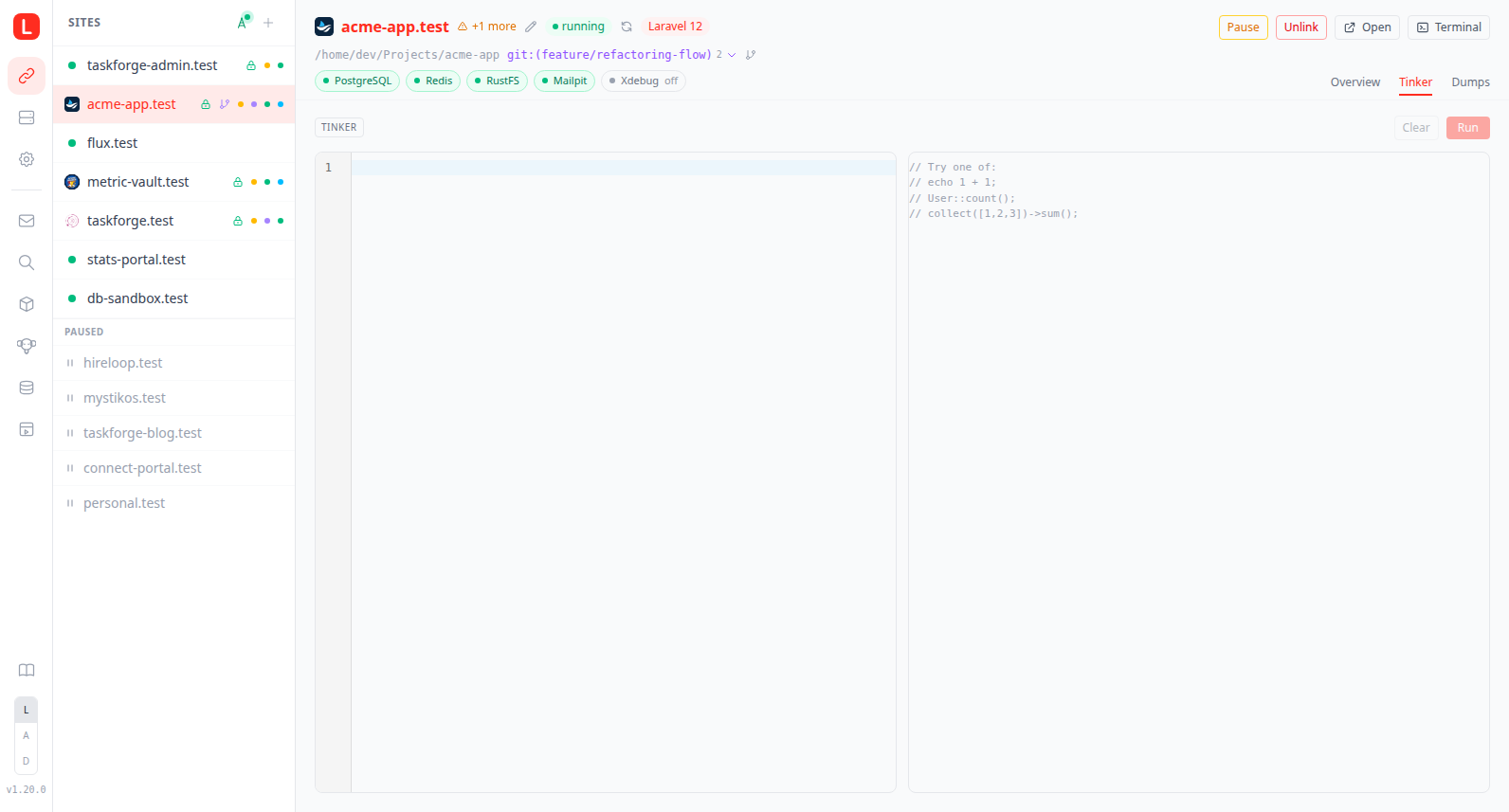
Useful for the things you'd otherwise do in php artisan tinker or a bin/console session: one-off model lookups, data fixes, snippet experiments, regex sanity checks, expression evaluation against a real database.
How a run works
The Run button POSTs your code to lerd-ui, which executes it inside the site's PHP container and returns the captured output. The execution mode is driven by the framework definition's tinker: block (see framework definitions below):
- Framework-defined REPL: when the active framework declares a
tinker:block in its YAML and the declaredrequires_package/requires_filechecks pass, lerd runs the framework's REPL. For Laravel that'sphp artisan tinker --execute=..., so the app is bootstrapped:User::count(),Route::getRoutes(),Cache::get('foo')all just work. Themodefield in the response is set to the framework name (e.g."laravel"). - Plain
phpfallback: any site without a satisfied framework REPL (Symfony, vanilla PHP, Laravel withoutlaravel/tinkerinstalled). The code is written to a temp script inside the site, withvendor/autoload.phpauto-required if it exists, and executed viaphp {file}.modeis"php".
The active mode is shown as a small badge in the toolbar.
Framework-defined REPL
Each framework YAML in lerd-frameworks/frameworks/<name>/<version>.yaml can declare a tinker: block:
# laravel/12.yaml
tinker:
  command: ["artisan", "tinker"]   # appended to `php …` inside the container
  execute_flag: "--execute"        # how to pass user code (omit → pipe via stdin)
  requires_package: laravel/tinker # vendor/<this> must exist
  requires_file: artisan           # this path must exist relative to the site
Resolution rules:
- If
requires_fileis set and the file is missing, the framework's REPL is skipped. - If
requires_packageis set andvendor/<package>is missing, the framework's REPL is skipped. - Otherwise, lerd runs
podman exec ... php <Command…>and either appends<execute_flag>=<code>or pipes the code via stdin.
To add Tinker support for another framework, ship a tinker: block in its YAML, no Go changes needed. Examples:
# A hypothetical Symfony with psysh installed
tinker:
  command: ["vendor/bin/psysh"]
requires_package: psy/psysh# A Drupal-with-drush setup
tinker:
command: ["vendor/bin/drush", "php-eval"]
execute_flag: "" # piped via stdin
requires_file: drush.phpSnippets
Reusable snippets can be committed inside the project and shared with the whole team, Tinkerwell-style. The Snippets menu in the toolbar lists them; picking one loads it into the editor so you can tweak it before hitting Run, nothing executes on selection. If the editor already holds something else, loading asks for confirmation first so a draft is never silently replaced.
The same menu manages snippets. Save editor as snippet… stores the current editor contents under a name of your choosing, either in the project or in your global folder; saving over an existing name asks before overwriting. Each row has a delete button (hover to reveal) that removes the file after a confirmation. Tinkerwell snippets are read-only: lerd lists them but never writes into another tool's directory, so their rows carry no delete and saving always targets the project or global folder.
Snippets are plain .php files, gathered from three places, in this order:
| Location | Scope |
|---|---|
.lerd/tinker/snippets/ in the project | Shared with the team via version control |
.tinkerwell/snippets/ in the project | Read as-is, so existing Tinkerwell snippets work without moving them |
~/.config/lerd/tinker/snippets/ | Personal snippets, available on every site |
One file is one snippet. The label in the picker is the filename without its extension, unless the file carries a name header in its first lines:
// @name Reset demo data
Order::truncate();
Seeder::run();
The dropdown shows which folder each snippet came from, and worktrees read snippets from their own checkout. Files over 64 KB (the run request cap), dotfiles, and anything that isn't a .php file are ignored, and subdirectories are not scanned.
Output rendering
The output panel is styled like a read-only editor: bordered box, monospace, line-number gutter rendered as CSS pseudo-elements so dragging across results never selects or copies the line numbers.
- One block per top-level statement. Backend injects an ASCII
0x1Eseparator after each statement, frontend splits on it. Multi-line scripts produce a numbered list of outputs, not one concatenated blob. - Each block is framed with its source line and a
Line Nbadge. Every result shows the editor line that produced it, so in a multi-statement script you can see at a glance which line emitted which value. The output gutter collapses on rows without a marker, so results sit flush against the left edge. - Laravel runs capture executed SQL. A DB query listener inlines the bindings and renders every query that ran during a statement as its own full-width card, ordered just ahead of the result that triggered it, so you see exactly what hit the database (Tinkerwell-style). Laravel REPL mode only.
- Bare expressions auto-dump. Type
User::count()(nodump, noecho) and you see the value. The transformer wraps single-statement bare expressions indump(...)(orvar_dump(...)if Symfony VarDumper isn't installed). Statements that already produce side effects (echo,return,throw, control flow) are left alone. - Collapsible tree view for objects/arrays. Symfony VarDumper output is parsed client-side into a tree: classes, arrays, scalars, with click-to-expand/collapse, color-coded scalars, and visibility prefixes (
+public,#protected,-private). - Per-block Copy button appears on hover.
- Noise stripped server-side:
[!] Aliasing 'X' to 'Y'notices and// vendor/psy/.../eval()'d code:Nannotations are removed before output is returned.
Editor
The Monaco editor (the engine behind VS Code) with PHP syntax highlighting, line numbers, bracket matching, undo/redo, and line wrapping. Light/dark theme follows the Lerd theme. Monaco is lazy-loaded the first time you open any editor surface, so it never weighs down the initial dashboard load.
Language intelligence (phpantom_lsp)
Autocomplete, diagnostics, hover, and signature help are powered by phpantom_lsp, a fast, self-contained Rust PHP language server. It bundles phpstorm-stubs and the Mago parser, so it needs no PHP runtime to analyze a project, lerd runs it on the host (managed binary in ~/.local/share/lerd/bin/phpantom_lsp, like fnm/mkcert/composer) pointed at the site's project directory.
Because it analyzes the real project, completions are genuinely project-aware: your Eloquent models, relationships, scopes, casts and Builder chains resolve end-to-end, alongside framework facades, vendor classes, and the PHP standard library. Hover a symbol for its docblock; type ( inside a call for signature help.
Quick fixes and imports are wired in too: the "Class not found" diagnostic offers an Import App\Models\X action, and accepting a class from the completion list brings its use statement along. Imports land at the top of the buffer with a blank line separating them from your code. Document formatting runs through phpantom on Shift+Alt+F and automatically on paste.
Highlighting comes from Monaco's own PHP grammar, registered to start inside PHP because tinker buffers carry no <?php opener, with phpantom's semantic tokens layered over it for what a grammar cannot know, such as a static call or a closure parameter. The grammar colours the buffer on its own when the server is unavailable.
The browser connects to the server over a WebSocket (/api/lsp/php). lerd-ui spawns one phpantom_lsp process per connection, rooted at the site (or worktree) path, and bridges its stdio LSP traffic to Monaco. Tinker buffers are headerless PHP, so the bridge presents the document to the server with a synthetic leading <?php line (and offsets positions accordingly), you keep typing bare snippets while the server still parses valid PHP.
A small status hint sits in the toolbar while the server is starting, and switches to "Language server unavailable" if it can't be reached. When that happens (offline first-run download, unsupported platform) the editor still works and code still runs, only the live intelligence is missing.
The server binary is fetched at lerd install time, and lazily on first connect for existing installs, so no manual setup is required.
Keyboard
| Shortcut | Action |
|---|---|
Ctrl+Enter / Cmd+Enter | Run the editor contents |
Ctrl+Space | Trigger autocomplete |
Shift+Alt+F | Format the document via phpantom (also runs on paste) |
Ctrl+Z / Ctrl+Y | Undo / redo |
Drafts
The editor contents are saved to localStorage under tinker:{domain}:draft, so refreshing the page or switching to another site and back doesn't lose what you typed. The active tab itself (Overview vs Tinker) also persists, under lerd:siteDetailTab.
Toolbar
| Button | What it does |
|---|---|
| Mode badge | Shows tinker or php; tooltip explains which runtime is used. |
| Duration | Shown after a run, in milliseconds. |
| Snippets | Opens the snippets menu: load one into the editor, save the editor contents as a new or updated snippet, or delete one. See Snippets. |
| Split direction | Flips the editor and output between side by side and stacked. Hidden on narrow screens, where stacked is the only sensible layout. The choice is remembered across sessions under tinker:splitDir. |
| Full screen | Expands the editor and output to fill the viewport, hiding the surrounding navigation. The site domain, and the branch when you are on a worktree, appear next to the mode badge so you can see what you are running against. Press Esc or click the button again to leave. |
Copy code | Copies the editor contents to the clipboard. |
| Clear | Wipes both the editor and the output. |
| Run | Executes the code (also bound to Ctrl/Cmd+Enter); the icon spins while a run is in flight. |
The toolbar actions are icon buttons with tooltips, matching the log viewer.
The output panel itself adds a per-block Copy button on hover, for copying just one of the numbered output blocks.
When the tab is hidden
The Tinker tab is shown for any site that has a php_version. It is hidden for static-only sites and custom-container sites without a PHP runtime. Paused sites still get the tab, pausing only removes routing, the shared PHP-FPM container stays up.
Limits
- Each run has a 30-second hard timeout (
exec.CommandContext). - Request body is capped at 64 KB.
- Each run is a fresh process. Variables don't persist across runs, this is not a stateful REPL session.
- Output is captured all at once, not streamed. A long-running script that prints incrementally only shows output after it finishes.
- ANSI colors are suppressed at the source (
NO_COLOR=1,TERM=dumb) so output renders cleanly.
Security note
The Tinker tab executes arbitrary PHP inside your site's container with the same access as the site itself: database, filesystem under the site path, every credential in .env. Treat it as equivalent to shell access to that container. lerd-ui only listens on 127.0.0.1:7073, so this is bounded to the local machine, but any browser tab open to http://lerd.localhost can reach it.
HTTP API
| Method + Path | Body | Returns |
|---|---|---|
POST /api/sites/{domain}/tinker | { "code": "..." } | { ok, stdout, stderr, exit_code, duration_ms, mode, error? } |
GET /api/sites/{domain}/tinker:snippets | none | [ { name, label, source, content } ], source is project, tinkerwell or global |
POST /api/sites/{domain}/tinker:snippets | { "name", "source", "content" } | the refreshed snippet list; source must be project or global, .php is appended to the name when missing |
DELETE /api/sites/{domain}/tinker:snippets?source=…&name=… | none | the refreshed snippet list; only project and global files can be deleted |
GET /api/lsp/php?domain={domain}&branch={branch} | WebSocket | LSP JSON-RPC bridged to phpantom_lsp (one message per text frame) |
Output from tinker runs uses ASCII 0x1E (record separator) between top-level statements; the frontend splits on it. Aliasing notices and psysh source-location annotations are stripped before being returned.
The /api/lsp/php socket first sends a single {"type":"lerd-root","root":"…"} handshake frame so the browser can build the document URI for the workspace; every subsequent frame is a raw LSP JSON-RPC message.
Implementation map
Backend (Go):
internal/cli/tinker.go:RunTinker, the dump-function detector, the multi-statement transformer,splitTopLevelStatements, the auto-dump heuristic, output cleanup.internal/phpantom/phpantom.go: manages thephpantom_lsphost binary: platform asset resolution, pinned-version download, tar extraction intoBinDir.internal/ui/lsp.go:handleLSPPhp, the WebSocket ↔ stdio LSP framing bridge (readLSPMessage/encodeLSPMessage).internal/ui/server.go: thetinkercase on the site action handler and the/api/lsp/phproute.internal/ui/tinker_snippets.go: snippet directory scanning and thetinker:snippetshandler.- Tests:
tinker_test.go,internal/ui/tinker_snippets_test.go,internal/ui/lsp_test.go,internal/phpantom/phpantom_test.go.
Frontend (Svelte 5 + Monaco):
internal/ui/web/src/components/MonacoEditor.svelte: reusable lazy-loaded Monaco wrapper.internal/ui/web/src/lib/monaco.ts: single-instance Monaco loader (editor.api + PHP grammar, themes, worker).internal/ui/web/src/lib/lsp.ts: dependency-free LSP client: completion/hover/signature providers, diagnostics-to-markers, headerless-REPL position mapping.internal/ui/web/src/tabs/sites/SiteTinkerTab.svelte: editor, LSP wiring, output rendering.internal/ui/web/src/components/DumpView.svelte: recursive collapsible tree.internal/ui/web/src/lib/dump-parser.ts: parses Symfony VarDumper CLI output into a tree (+ tests).internal/ui/web/src/tabs/sites/SiteDetail.svelte: host the tabs in the bottom-right ofSiteHeader.internal/ui/web/src/stores/sites.ts:runTinkerAPI helper.